
The Job History tab on the Orchestrator Keyfactor orchestrators perform a variety of functions, including managing certificate stores and SSH key stores. Jobs page shows a record of discovery, inventory, and management jobs for certificate stores, SSH The SSH (secure shell) protocol provides for secure connections between computers. It provides several options for authentication, including public key, and protects the communications with strong encryption. servers, SSL TLS (Transport Layer Security) and its predecessor SSL (Secure Sockets Layer) are protocols for establishing authenticated and encrypted links between networked computers. endpoints, and remote CAs. By default, it retains the three most recent inventory jobs, whether they have a status of Warning, Failure, or Success. This value is configurable using the Orchestrator Job History Limit application setting (see Application Settings: Agents Tab). Each job record includes status details and diagnostic messages for failed or warning jobs to assist with troubleshooting.
Orchestrators → Jobs → Job History Tab
There are several settings that control the behavior of orchestrator jobs in application settings (see Application Settings: Agents Tab), most notably:
- Job Failures and Warnings Age Out (days)
- Notification Alert Email Recipients
- Notification Alert Interval (minutes)
- Number of times a job will retry before reporting failure
- Number of times a job will retry connecting to PAM PAM (Privileged Access Management): Controls privileged access by vaulting credentials, enforcing least-privilege/just-in-time access, rotating secrets, and auditing sessions. Across Keyfactor products, PAM protects diverse sensitive operations and secrets—for example certificate stores and CA credentials—via built-in or third-party providers; external integrations are delivered as custom PAM extensions (several published on Keyfactor’s public GitHub). providers
The actions available on the Job History tab are shown below.
Searching Job History
This page supports the standard query format described in Using Search in the Management Portal and includes its own set of query parsers specific to this operation. Use the following parsers to filter and refine results for this page.
-
AgentID
Orchestrator ID matches or doesn’t match the entered GUID. This is primarily used for internally generated searches when the user is redirected here from another page.
-
Agent
Complete or partial matches with the orchestrator name as listed in the orchestrator field.
-
JobID
Job ID matches or doesn’t match the entered GUID. This is primarily used for internally generated searches when the user is redirected here from another page.
-
JobType
Job Type matches or does not match the referenced type. Supported categories are:
-
Management
-
Inventory
-
-
-
-
Message
Partial matches with the error or warning message listed in the Message field.
-
OperationEnd
Operation End before or after a specified date and time. Supports the %TODAY% token (see Advanced Search).
-
OrchestratorPoolId
Complete matches with the Keyfactor Command reference GUID for the orchestrator pool.
-
OrchestratorPoolName
Complete or partial matches with the orchestrator pool name.
-
OperationStart
Operation Start before or after a specified date and time. Supports the %TODAY% token (see Advanced Search).
-
Result
Result matches or doesn’t match the selected category:
- Failure
- Warning
- Success
- Unknown
-
ScheduleType
Schedule Type matches or does not match the referenced type. Supported schedule types are:
-
Immediate
-
Interval
-
Daily
-
Weekly
-
Monthly
-
Once
-
-
Status
Status matches or doesn’t match the selected category:
- Acknowledged
- Completed
- InProcess
- Waiting
- Unknown
- CompletedWillRetry.
-
TargetPath
Complete or partial matches with the contents of the Target field, including the target machine name and the certificate store path and file name for types of jobs listing those, or for SSL jobs, the endpoint
An endpoint is a URL that enables the API to gain access to resources on a server. group name, or for remote CA synchronization jobs, the CA name.
Expand Message
To view the details of an error or warning message, double-click an orchestrator job history result or select the result and choose Expand Message from the toolbar or right-click menu.
Reschedule
To reschedule a job, correct the error that caused the problem, then select the job in the orchestrator job history grid and choose Reschedule from the toolbar or right-click menu.
Acknowledge
To mark a job in an error or warning state as acknowledged, select the job in the orchestrator job history grid and choose Acknowledge from the toolbar or right-click menu. Jobs that are in progress or have completed successfully cannot be marked as acknowledged.
The number displayed on the Job History tab indicates how many failures and warnings have occurred within a defined time period. By default, this includes jobs from the past seven days and excludes any jobs that have been marked as acknowledged. This count acts as a reminder to review recent failures and warnings.
Marking a job as acknowledged removes it from this count.
The reporting period is configurable using the Job Failures and Warnings Age Out (days) application setting (see Application Settings: Agents Tab).
Acknowledge All
To mark all failed and warning jobs as acknowledged, choose Acknowledge All from the toolbar. Jobs that are in progress or have completed successfully cannot be marked as acknowledged.
This action clears the failure and warning count displayed on the Job History tab by marking all eligible jobs within the reporting period (see Acknowledge) as acknowledged.
Job History Grid Fields
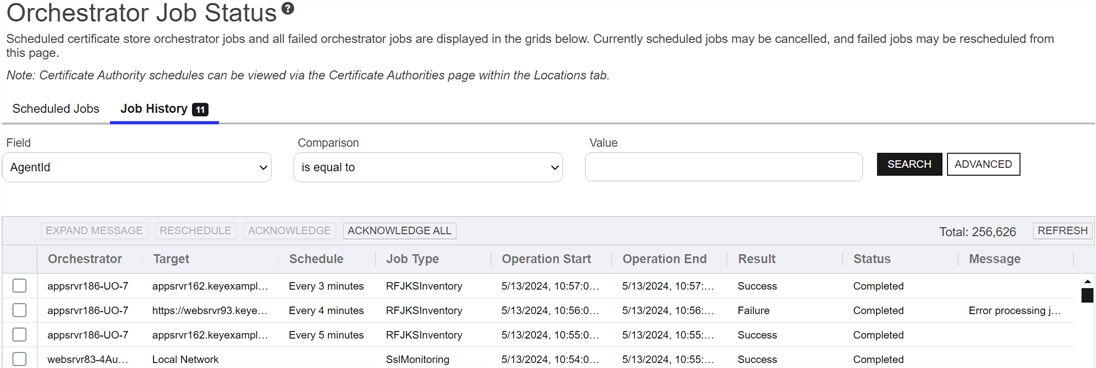
Figure 360: Orchestrator Job History
The Job History grid includes these fields:
Orchestrator
The host on which the orchestrator was running.
Target
The target machine name followed by the path and file name to the certificate store on the target machine for many types of jobs, the endpoint group name for SSL jobs, or the CA name for remote CA jobs. This field may be blank for some types of jobs.
Schedule
The time at which or frequency with which a job was scheduled to run. Add and remove certificate jobs, will show Immediately unless they were scheduled for a later time. Renewal and ODKG (on-device key generation, formerly re-enrollment Certificate enrollment refers to the process by which a user requests a digital certificate. The user must submit the request to a certificate authority (CA).) jobs will always show Immediate or Exactly Once.
Job Type
The type of job that was run as defined on the orchestrator.
Operation Start
The time at which the job was run.
Operation End
The time at which the job was completed.
Result
The outcome of the job:
- Success
- Failure
- Warning
Under some circumstances—for example, jobs that are still actively running—Unknown may appear here.
Status
The status of the job:
-
Acknowledged
The job has failed or encountered a warning and has been acknowledged (see Acknowledge).
-
Assigned
The job has been assigned to an orchestrator pool and is awaiting execution.
-
Completed
The job has completed. Completion may include a success, failure, or warning status.
-
CompletedWillRetry
The job has failed or encountered a warning and is scheduled for automatic retry.
The job automatically retries five times, by default, and cannot be rescheduled because it is still attempting to run. See the Number of times a job will retry before reporting failure in Application Settings: Agents Tab.
-
InProcess.
The job is currently running.
Message
The message indicating the reason for the failure or warning, if applicable. Double-click the job history record or select the record and choose Expand Message from the toolbar or right-click menu to read the error message in full.